News
View Real-Time Usage Graphs
On the “Active Data Sessions” widget on the customer edit screen (customer profile), you can now see the real-time usage graph for active radius users.
Click on the “Show Real-time usage graph” button on the widget:
On the “Active Data Sessions” widget on the customer edit screen (customer profile), you can now see the real-time usage graph for active radius users.
Click on the “Show Real-time usage graph” button on the widget:
Now you can choose if you want to notify customer on ticket closure.
The ability to disable the notification to the customer on ticket closure has been added to v1.21.12
When you clicked on the close button on a ticket and the “Close Ticket” popup shows, you can set the value for “Notify the Customer?” to “No” if you do not want to notify the customer. The default value is “Yes”
Tickets now have a “Reason” field, to indicate what caused the ticket to be raised. This will assist in helpdesk ticket reporting.
Please note that the diagnosis field is similar than the reason field, but the reason field is a more restricted field to improve reporting.
This feature is part of the v1.21.13 release.
Go to Workflow –> Helpdesk Ticket List and edit a ticket
In your system’s help menu you can find all the latest DataTill user guides and setup guides.
The help menu is labeled as: (?)
You can also submit support or feature requests from your help menu to the DataTill team.
The new support and feature request menu items are available on your system from v1.21.11
The helpdesk ticket merging function has been improved to give the user more power over what happens in the merge.
The admin user will be able to select what happens in the merge, such as to whom the merged ticket should be assigned to and which ticket should be kept as the merged ticket.
The improved ticket merging functionality is available from v1.21.08
Two factor authentication has been added in version 1.21.10
With regards to compliance with GDPR and the Protection of Personal Information Act (4 of 2013), DataTill can be setup in such a way to prevent personal information from being lost, changed or stolen.
The identity of admin staff using DataTill can be ensured using two-factor authentication, controlling who has access to customer information on the system.
The customer portal does not have two factor authentication.
Changes to helpdesk ticket default list view includes:
You will automatically get notifications if you are subscribed to “Helpdesk Notifications” in your user’s account settings.
Helpdesk notifications includes: when you are assigned to a helpdesk ticket and when the ticket gets updated.
To get update notifications even when you are not assigned to a ticket, you can follow a ticket.
Following tickets also helps if you want to quickly find a ticket in your ticket list.
The helpdesk ticket follower feature has been added in v1.21.09.
We have added the ability to pre-fill the fields available on the <your_instance>/sales/apply form.
Please note this only works if you have the Sales Leads module activated on your instance.
This feature is only available on DataTill version v1.21.09 onwards.
The idea is that should you have a website (eg. wordpress) with an application form. The application form can look however you design it to look.
The application form’s fields should then get the values the user types in and populate the values as parameters in a URL when the user clicks on “Apply Online” on your website. Then it will take them to your DataTill’s system “Apply Online” screen with all the values prefilled as was filled in on your website.
Your_DataTill_Instance_Domain/sales/apply?leadsource=Website&mobile=0799999999&email=joesoap@beemail.com&idnumber=9001025046087&
contactname=Joe%20Soap&comments=This%20is%20a%20comment&companyname=test%20company&
type=Company&street=21%20kerk%20street&suburb=Bodorp&city=George&postalcode=6529

You can pre-populate the Datatill sales application form by supplying parameters below. (more…)
DataTill will be exhibiting at this year’s MUM (Mikrotik User Event) event in Cape Town. Like our page and share this post to stand a chance to receive a free voucher.
The quote search screen will allow you to search for quotes easier. You can view and download the quote from the search screen.
You will also be able to open the related sales lead, ticket and customer for each quote.
The quote screen has been updated in v1.21.00.
You will now be able to search across all lead statuses in the workflow and will be able to search for closed leads on one screen.
This screen is available from v1.21.04.
Go to Sales –> Lead Search
DataTill now monitors and reports on Network Device interface changes.
[This change is in affect from v.1.21.01]
A new cron job called “scan_devices” runs on a fast interval of every 5 minutes. This cron job is written exclusively in perl so as to be fast & lightweight, and does not call any PHP code. It scans all network devices via snmp or Mikrotik API to read the current status of the attached ethernet & vlan interfaces.
Network interface change detection:
When it detects a network interface change of mtu, sync speed, running state or interface name it generates a notification which will be sent to all admin users subscribed to the new “Network Devices Interface Changes” notification. These notifications can be delivered via email, sms or push message (slack).
To help with context on helpdesk tickets, a new “Other Tickets” widget has been added on the right side bar of tickets when you open them. The Other Tickets widget will show all tickets for the same customer that the current selected ticket is for.
Support For SFTP Backups Added Support for SFTP system backups has been added. Go to Setup –> System Settings –> System Backups Scroll down to FTP Settings and you will be able to choose between SFTP and FTP as the FTP Method.
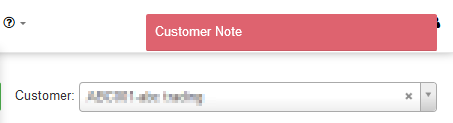
Customer notes can be set up to pop up automatically each time the Edit Customer screen is opened up.
The auto popup customer note will look similar to this example. It will show at the top right of the Edit Customer screen.
Customer ratings can be sent out in 4 ways:
This post only looks at service ratings sent out on closure of helpdesk tickets.
Debtors notes can be added to show on the Edit Customer (Customer Profile) screen. A new feature has been added to manage these debtor note templates as categories in the Categories screen.
Debtor notes can also be set to pop up automatically on the Edit Customer screen when there is one or more auto popup notes on the selected customer. The note will then pop up each time the Edit Customer screen is opened.
A guide has been added on how to set up a radius user in DataTill to authenticate and disconnect through Telkom IPC. See the full guide here: DataTill & IPC