Marketing
Double Data Top-ups:
Double Data Top-up marketing promotions has been added to DataTill.
Go to Sales > Sales Settings > Marketing Setup
Marketing Setup Video: https://youtu.be/U10MsEhpAkQ
How to Enable the Double Data Top-up Promotion:
You can enable or disable the promotion, and define a date range during which the promotion is in effect:

How to know if the Double Data Top-up Promotion is enabled:
When customers or the helpdesk adds top-ups, a prominent blue box will display if the promotion is in effect on the top up popup screen:

If the double data top up is active, the double top-ups will apply to all top-ups done by helpdesk or by the customer, either via the customer portal, via SMS or via the API.
How does the Double Data Top-up work?
The customer or helpdesk should just top-up the normal size, the system will automatically apply double the data while it is in active and in the correct date range.
Sales Leads & Promotions
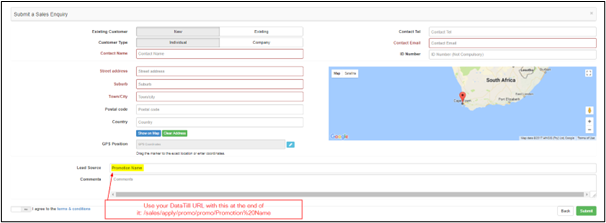
When special promotions are advertised on your website, you can add this link on your website to DataTill’s online application with the promotion name at the end of the URL, to automatically specify the Lead Source on the online application for a Sales Lead.
Here is the URL: yourdomain/sales/apply/promo/ (promotion name without brackets)
By doing this you will be able to tell if this customer is applying for the specific promotion that you have offered them.